
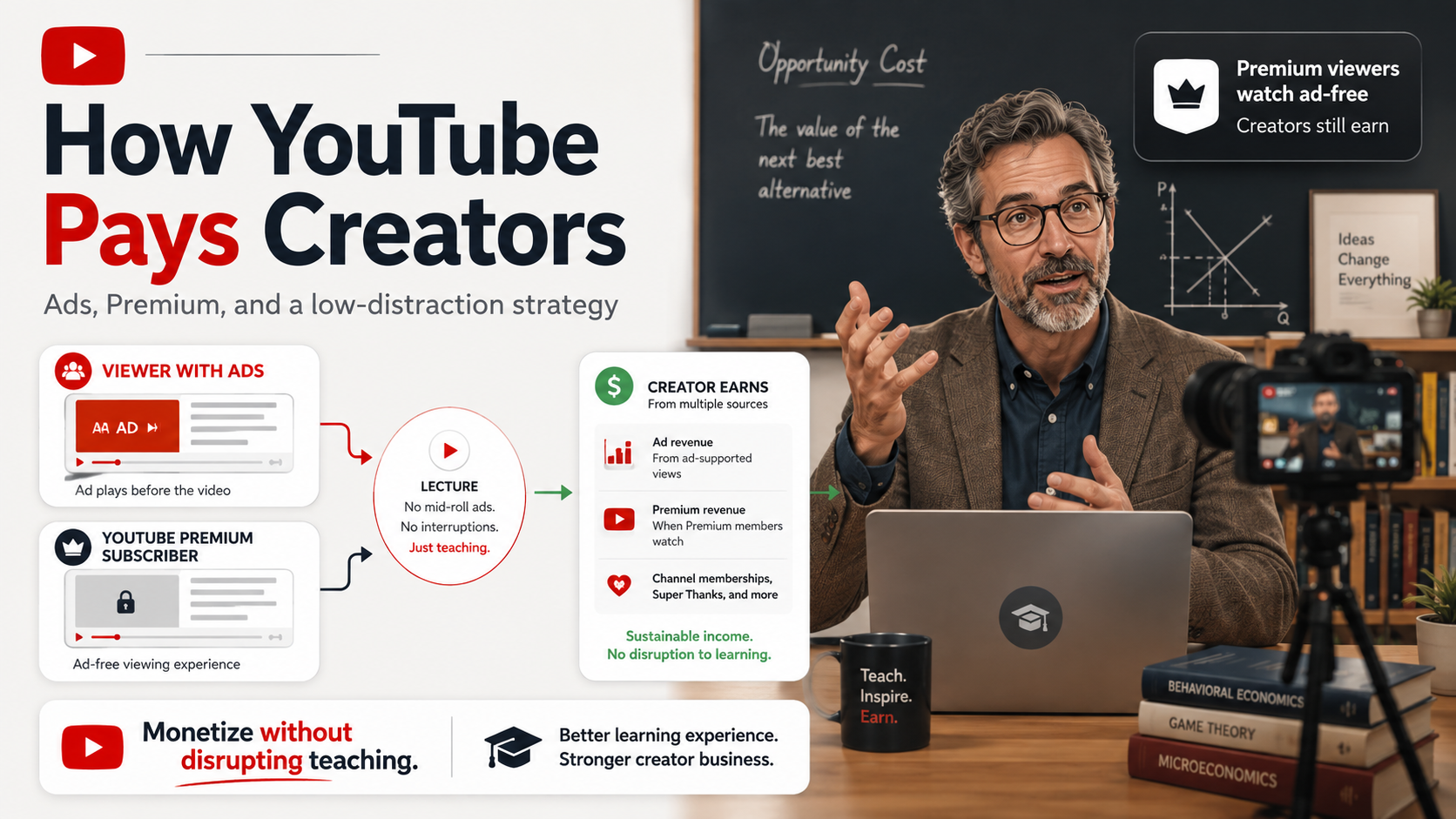
Can you earn from YouTube without turning a lecture into an ad break?
Imagine a college professor whose original lectures have reached YouTube’s full ads-and-Premium threshold: 1,000 subscribers plus 4,000 valid public watch hours in 12 months (or 10 million valid Shorts views in 90 days). He wants to monetize—but does not want commercials interrupting the lesson. YouTube eligibility ↗
This is the best current compromise. It keeps the middle of the lecture free of creator-enabled ad breaks while preserving Watch Page ad revenue and YouTube Premium revenue. YouTube pays creators 55% of net eligible Watch Page ad revenue. Revenue share ↗
The catch is important: on new long-form uploads, YouTube no longer lets creators independently turn off pre-roll, post-roll, skippable, or non-skippable formats. Once Watch Page ads are enabled, YouTube decides which of those formats to serve when appropriate. Mid-rolls remain separately controllable. Ad controls ↗
Choose the professor’s priority
The professor preserves Watch Page ad revenue and Premium revenue while keeping the middle of the lecture free of creator-enabled commercial breaks. A pre-roll or post-roll can still be served by YouTube.
Where the money comes from
YouTube does not pay one fixed amount per view. The professor can earn from normal Watch Page advertising and from Premium members who watch without normal ads.
Sources: Partner earnings ↗ Premium allocation ↗
Why the professor may have a head start
A curriculum is already a content map
One course can become full lectures, focused explainers, exam-review videos, demonstrations, Shorts, and playlists.
Student questions reveal demand
If the same concept confuses students every semester, there is a good chance other learners search for the same explanation.
Evergreen lessons can compound
A strong explanation can keep receiving views from future students, teachers, and independent learners long after the semester ends.
There is no documented “professor boost” in YouTube’s recommendation system. The advantage above is a strategic inference based on expertise, recurring questions, and reusable educational material—not a YouTube policy claim.
What ethical monetization looks like
Good boundaries
- Keep required course material available through normal school systems.
- Use YouTube as an optional public educational resource.
- Disable mid-rolls on normal lectures.
- Keep affiliate products optional and clearly disclosed.
- Consider blocking clearly inappropriate advertiser categories.
Do not do this
- Do not make grades or participation depend on monetized YouTube viewing.
- Do not pressure students to buy products.
- Do not tell students to click ads.
- Do not tell viewers to keep ads playing so the creator earns more.
One simple public promise works well: “No ads during instruction.” It is more accurate than “this channel has no ads,” because YouTube may still serve an ad before or after a monetized lecture. And even turning monetization off does not absolutely guarantee YouTube will never show advertising around a video. Ads on non-YPP videos ↗
What could a YouTube channel realistically earn?
YouTube does not publish one universal “pay per 1,000 views” number. Instead, creators can use RPM in YouTube Analytics to see how much revenue their own channel earned per 1,000 views after YouTube’s revenue share. RPM vs. CPM ↗
Model the professor’s monthly revenue
Use an RPM scenario now; replace it with the channel’s actual RPM once YouTube Analytics has enough data.
This calculator is arithmetic, not an earnings promise. YouTube says RPM includes relevant creator revenue sources reported in Analytics and that actual creator earnings are not guaranteed. Earnings terms ↗
If the professor’s catalog eventually produces 100,000 monthly views and his own Analytics shows a $5 RPM, that would model to about $500 for that month. If the catalog reaches 500,000 monthly views at the same observed RPM, the same arithmetic produces about $2,500. The important number is not somebody else’s RPM screenshot—it is the professor’s own data.
Why YouTube Premium matters for educational channels
Premium members watch YouTube without normal ads, but creators can still be paid. YouTube says Premium membership revenue is distributed to creators based on how much Premium members watch their content. Downloaded viewing is incorporated when the member reconnects, and background playback counts toward watch time. Premium creator FAQ ↗
That makes a 30-, 45-, or 60-minute educational video particularly interesting: a Premium subscriber can watch an uninterrupted lecture while still contributing to the creator’s revenue. For long-form videos, YouTube currently requires the creator to accept the Watch Page Monetization Module and turn on Watch Page ads to receive Premium revenue. Watch Page module ↗
YouTube is more than AdSense
Long-form ads shown before, during, after, or around eligible videos.
A share of membership revenue when Premium subscribers watch eligible content.
Eligible creators can use memberships, Super Thanks, Super Chat, and Super Stickers.
Eligible creators can sell their own products or participate in supported Shopping programs.
Official ways to earn on YouTube ↗
This gives an educator options. A professor who decides that even a possible pre-roll is too much for core lectures can turn Watch Page monetization off on those videos and still build a broader creator business through other eligible tools, outside sponsorships, or disclosed affiliate links. The tradeoff is that those particular long-form videos will not earn normal Watch Page ad or Premium revenue under the current rules.
How the money reaches the creator
YouTube Analytics shows estimated revenue. It can still change.
Finalized earnings for the prior month are normally added to AdSense for YouTube.
If the payment threshold and account requirements are satisfied, payment is generally issued.
Finalized earnings ↗ Payment timeline ↗
A policy change creators often misunderstand
YouTube says this was a clarification—not a brand-new ban. Mass-produced or highly repetitive content was already ineligible. YouTube renamed the policy to make that clearer, while saying its separate reused-content policy did not change. Original educational content with materially different substance from video to video remains compatible with monetization policy. Monetization policy ↗
That matters for new creator channels using AI or templates. YouTube’s current policy focuses on whether the result is original, authentic, and meaningfully varied—not simply whether automation was involved. Generic mass-produced template videos can create monetization problems; a professor teaching distinct concepts with original explanations is a very different content model.
Creator technology people often discover they need after they start
A new channel does not need an expensive studio. Start with a phone or existing computer, publish, and find the bottleneck. These are four upgrades that often solve actual production problems rather than simply making a shopping list longer.
Affiliate disclosure: As an Amazon Associate, A Wandering Mind earns from qualifying purchases. These links are included because the categories fit common creator workflows; purchasing through them does not change our editorial conclusions.
Clear audio is often a more valuable first upgrade than a more expensive camera.
Compare microphones on AmazonBetter lighting can improve a phone or webcam without replacing the camera.
Compare key lights on AmazonUseful for precise definitions, introductions, disclosures, and technical explanations.
Compare teleprompters on AmazonVideo footage, project files, thumbnails, and exports consume storage quickly.
Compare SSDs on AmazonDo not buy all four automatically. Publish first, identify the bottleneck, then fix the bottleneck.
Frequently asked questions
Can a creator remove the pre-roll but keep normal Watch Page and Premium monetization?
Not on a new long-form upload under YouTube’s current controls. YouTube removed the individual choices for pre-roll, post-roll, skippable, and non-skippable formats. Mid-rolls remain separately controllable. YouTube source ↗
Can a creator monetize a lecture without mid-roll ads?
Yes. On videos eight minutes or longer, mid-rolls can be turned off while Watch Page monetization remains on. YouTube source ↗
Can an old video keep older pre-roll choices?
Potentially. YouTube says it retained creators’ existing long-form ad choices unless those monetization settings are changed. YouTube source ↗
Can a creator earn Premium revenue if Watch Page ads are turned off?
For long-form video, YouTube currently says the creator must accept the Watch Page Monetization Module and turn on Watch Page ads to earn Premium revenue. YouTube source ↗
Does YouTube pay a fixed amount per 1,000 views?
No universal fixed creator rate is published. RPM in YouTube Analytics is the better measure of what a specific channel earned per 1,000 views after YouTube’s revenue share. YouTube source ↗
Can YouTube show ads even if a creator does not join YPP?
Yes. YouTube says ads may appear on videos from channels that are not in YPP, and rights holders can also monetize claimed material. YouTube source ↗
Primary YouTube sources
Source links appear next to the claims they support throughout the article. This consolidated list is for readers who want the policy documentation in one place.
- YouTube Partner Program overview and eligibility
- YouTube partner earnings overview
- YouTube advertising formats and creator controls
- Manage mid-roll ad breaks in long videos
- Turn off ads for individual videos / legacy choices
- Choose how you want to monetize
- Your content and YouTube Premium
- Understand RPM and CPM
- Check YouTube revenue and finalized earnings
- AdSense for YouTube payment timeline
- Why ads may appear on non-YPP videos
- Invalid traffic on your videos
- Block ads from appearing on your channel and videos
- How to earn money on YouTube
- YouTube channel monetization policies
Editorial note: Revenue scenarios are illustrations, not promises of earnings. YouTube policies and partner terms can change, so creators should confirm current settings and terms in YouTube Studio before making a business decision.